If you run a CNC router shop, you already know the sound — a sharp snap, the spindle whining freely, and a ruined workpiece staring back at you. Tool breakage is one of the most common (and most expensive) problems CNC operators face, whether you’re cutting plywood cabinet panels, engraving acrylic signage, or routing MDF furniture components.
The good news? Most bit breakage is completely preventable. It almost always comes down to two things: choosing the wrong bit for the job, and running the wrong speed and feed settings. Get those two variables right, and you’ll cut tool costs, reduce downtime, and get a cleaner finish on every job.
At Kataria Tech Zone, we’ve helped hundreds of woodworking, signage, and fabrication businesses across India set up their CNC router machines for maximum uptime. In this guide, we’ll break down exactly why CNC router bits break, how to pick the right bit for your material, and how to dial in spindle speed and feed rate so your tools last longer and your production line never stops.
Why CNC Router Bits Break: The Root Causes
Before we get to solutions, it helps to understand what’s actually happening at the cutting edge when a bit snaps. Tool breakage on a CNC router is almost never a “random” event — it’s the result of one or more of these mechanical stresses building up until the tool fails:
- Excessive feed rate for the bit’s flute count and diameter — pushing the material into the bit faster than it can clear chips.
- Insufficient spindle speed (RPM) relative to the feed rate, causing the bit to “dig in” rather than shear cleanly.
- Chip re-cutting — when chips aren’t cleared from the flutes fast enough, they get re-cut, generating heat and side-loading the bit.
- Wrong bit geometry for the material — for example, using a wood-cutting bit on acrylic or ACP, where heat build-up softens the material and grabs the tool.
- Poor workholding or excessive vibration from a machine with worn linear guides, a loose gantry, or an unbalanced spindle.
- Plunging too aggressively straight down instead of ramping or pre-drilling a pilot hole.
- Worn or dull tooling — a dull edge needs more force to cut, dramatically increasing the risk of snapping.
Notice that most of these issues trace back to two controllable factors: bit selection and speed/feed optimization. Let’s tackle both in detail.
Part 1: Choosing the Right CNC Router Bit
Match the Bit to the Material
Every material has a different cutting behavior, and using a generic “one bit fits all” approach is the fastest way to snap tools and ruin surface finish.
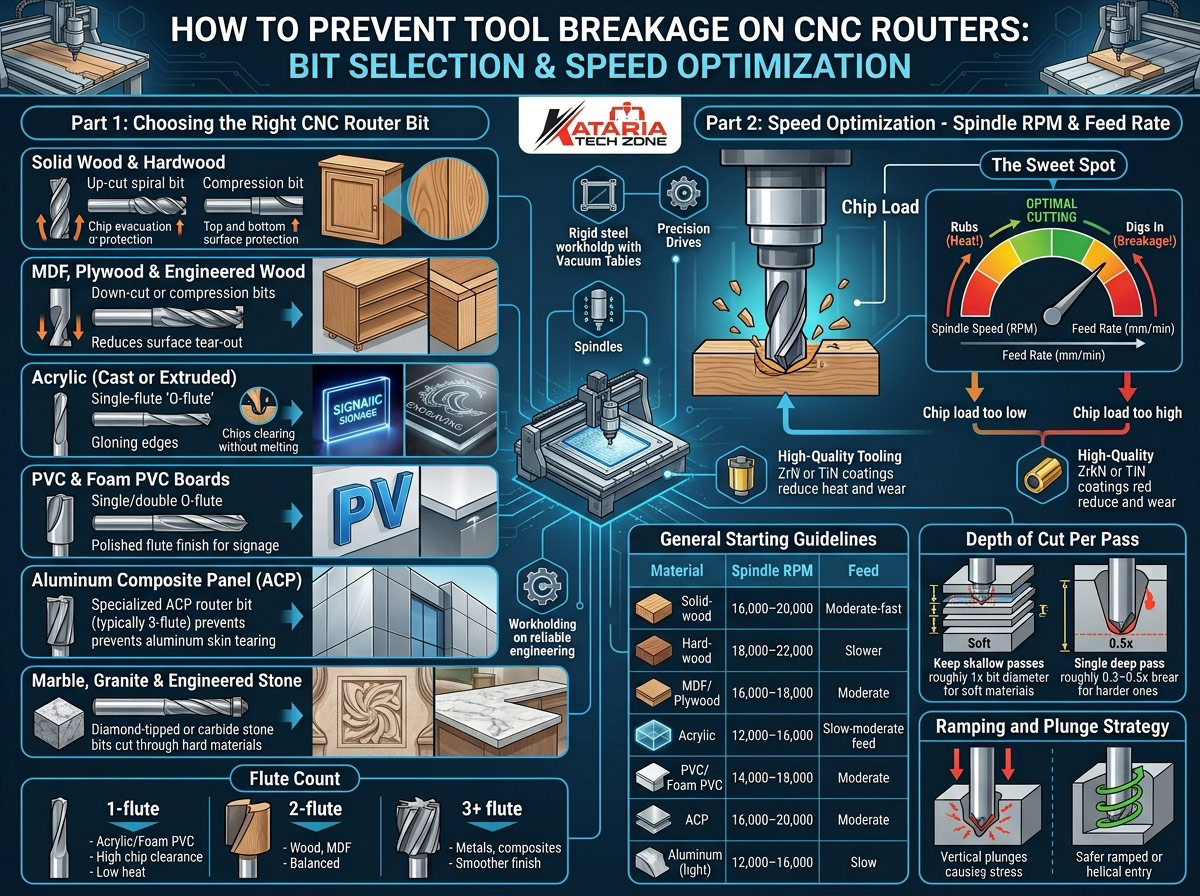
- Solid wood & hardwood: Use up-cut spiral bits for fast chip evacuation, or compression bits (up-cut at the bottom, down-cut at the top) for a clean surface on both faces. Our detailed comparison in Mastering CNC Routing on Solid Wood vs. Engineered Wood: Tooling, Feeds, and Speeds covers this in depth.
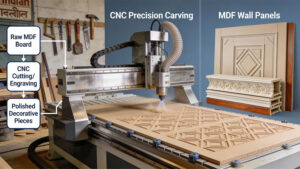
- MDF, plywood & engineered wood: Down-cut or compression bits reduce surface tear-out and chipping on veneered panels. If you’re producing decorative panels, see our guide on Creating MDF Wall Panels and Decorative Molding Using CNC Technology.
- Acrylic (cast or extruded): Use single-flute “O-flute” bits designed specifically for plastics — they clear chips efficiently and prevent the melting/re-welding that snaps standard wood bits. Full details here: Why Acrylic is Ideal for CNC Routing: Cast vs Extruded, Thickness Guide, and Edge Quality.
- PVC & foam PVC boards: Similar to acrylic — single or double O-flute bits with a polished flute finish reduce friction and heat. See Why PVC Excels in CNC Routing: Rigid vs. Flexible Grades, Foam PVC vs. Solid Sheets.
- Aluminum Composite Panel (ACP): Requires a specialized ACP router bit (typically a 3-flute design) with the correct helix angle to prevent the aluminum skin from tearing and the bit from overheating. Read more in What Makes ACP Perfect for CNC Routing.
- WPC panels: V-groove and straight bits with the correct flute geometry matter for clean folds and edges — see CNC Router For V-Grooving and Folding WPC Panels.
- Marble, granite & engineered stone: Requires diamond-tipped or carbide stone bits engineered for abrasive materials — general wood/plastic bits will shatter almost instantly. Our CNC Stone Router Machines are purpose-built for this, and our Ultimate Guide to CNC Stone Routing walks through tooling in detail.
Choose the Right Flute Count
- 1-flute (single flute): Best for soft plastics like acrylic and foam PVC — maximum chip clearance, minimum heat.
- 2-flute: The workhorse for wood, MDF, and plywood — a good balance of chip clearance and cutting force.
- 3+ flute: Used for finishing passes on metals and composites where a smoother edge matters more than fast chip evacuation.
More flutes mean smoother cuts but slower chip clearance. If you use a 3-flute bit at a feed rate meant for a 2-flute bit, chips can pack into the flutes and snap the tool — so flute count and feed rate must always be adjusted together.
Bit Diameter and Stick-Out Length
Thinner bits and longer “stick-out” (the length of the bit extending from the collet) dramatically increase the risk of breakage because they flex more under load. As a rule of thumb:
- Never use a bit stick-out longer than necessary for your material depth.
- For deep cuts, prefer multiple shallow passes over one deep pass with a long, thin bit.
- A 6mm bit is inherently more fragile than a 10mm bit — reduce feed rate and depth of cut accordingly when working with smaller diameters.
Don’t Skip Quality
Cheap, uncoated carbide bits dull quickly, run hotter, and are far more prone to chipping or snapping mid-job. Coated bits (TiN, ZrN) resist heat and wear significantly better, especially on abrasive materials like MDF and ACP, and pay for themselves in reduced tool changes and less scrapped material.
Part 2: Speed Optimization — Spindle RPM & Feed Rate
Bit selection solves half the problem. The other half is running your machine at the correct spindle speed (RPM) and feed rate (mm/min or inches/min) for that specific bit and material combination.
Understanding the Relationship
Feed rate and spindle speed aren’t independent settings — they work together to determine chip load, which is the thickness of material each cutting edge removes per revolution. Chip load is the single most important number in preventing tool breakage:
- Chip load too low (feed too slow relative to RPM): the bit rubs instead of cutting, generating excess heat, dulling the edge, and eventually causing it to snap from heat stress and friction.
- Chip load too high (feed too fast relative to RPM): the bit is forced to remove more material than it can handle per rotation, creating a mechanical overload that snaps the tool almost instantly.
The goal is to find the “sweet spot” chip load for your specific bit diameter, flute count, and material — neither starving the bit nor overloading it.
General Starting Guidelines
While exact numbers vary by bit brand and machine, these starting points work well for most workshop-grade CNC routers:
| Material | Spindle Speed | Feed Rate Guidance |
|---|---|---|
| Softwood | 16,000–20,000 RPM | Moderate-fast feed, 2-flute up-cut bit |
| Hardwood | 18,000–22,000 RPM | Slower feed than softwood, same bit type |
| MDF/Plywood | 16,000–18,000 RPM | Moderate feed, down-cut or compression bit |
| Acrylic | 12,000–16,000 RPM | Slow-moderate feed, single-flute O-bit |
| PVC/Foam PVC | 14,000–18,000 RPM | Moderate feed, single/double O-flute |
| ACP | 16,000–20,000 RPM | Moderate feed, 3-flute ACP bit |
| Aluminum (light) | 12,000–16,000 RPM | Slow feed, low depth of cut per pass |
Always start on the conservative end and test-cut a scrap piece before running a full production job. Listen to the machine — a clean, consistent cutting tone means you’re in the sweet spot; a screeching or straining sound means you need to adjust immediately.
Depth of Cut Per Pass
Trying to cut full material thickness in a single pass is one of the biggest causes of snapped bits, especially on hardwood, ACP, and stone. As a general rule:
- Keep depth of cut per pass to roughly 1x the bit diameter for softer materials.
- Reduce to 0.3–0.5x the bit diameter for harder or denser materials.
- Use multiple shallow passes for thick stock rather than forcing one deep pass.
Ramping and Plunge Strategy
Straight vertical plunges put enormous stress on the tip of the bit, especially with flat-bottom end mills. Where your CAM software allows it:
- Use ramped or helical entry instead of a straight plunge.
- Pre-drill a pilot hole for pocket cuts when possible.
- Reduce plunge feed rate to roughly 30–50% of your horizontal cutting feed rate.
Keep Your Machine Mechanically Sound
Even perfect bit selection and speed settings won’t save a tool if the machine itself is vibrating or misaligned. Regularly check:
- Spindle collet tightness and runout
- Gantry and linear guide alignment
- Vacuum hold-down pressure (loose material shifts and snaps bits instantly)
- Dust collection efficiency (poor chip clearance leads to re-cutting and heat build-up)
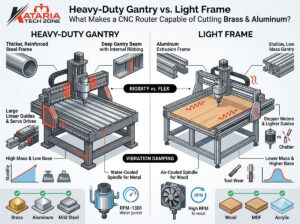
Machines with rigid, heavy-duty steel frames and precision ball-screw or rack-and-pinion drive systems — like the CNC routers built by Kataria Tech Zone — inherently reduce vibration-related tool breakage compared to lightweight, budget frames.
A Quick Troubleshooting Checklist
Next time a bit snaps, run through this checklist before blaming the tool:
- Was the feed rate too aggressive for the bit’s flute count and diameter?
- Was the spindle running at the correct RPM for the material?
- Was the correct bit geometry used for this specific material?
- Was depth of cut per pass appropriate for the bit diameter?
- Was the bit stick-out length minimized?
- Was the workpiece securely clamped or vacuum-held?
- Was the bit sharp, or overdue for replacement?
- Was chip evacuation/dust collection working properly?
Final Thoughts
Preventing tool breakage on a CNC router isn’t about luck — it’s about matching the right bit geometry to your material and running the correct spindle speed and feed rate for that combination. Get these fundamentals right, and you’ll see fewer snapped bits, cleaner edges, less wasted material, and a real drop in your monthly tooling costs.
At Kataria Tech Zone, every machine we build — from our compact 4×8 CNC Wood Router to our heavy-duty Servo CNC Router Machine and Top Rated 4 Axis CNC Router Machine — is engineered with a rigid frame, precision drive system, and reliable spindle to minimize the vibration and inconsistency that cause premature tool failure. If you’re setting up a new production line or upgrading an aging machine, our team can help you choose the right router and tooling setup for your exact material mix.
Explore our full range of CNC Router Machines or browse our CNC Stone Router Machines for marble and granite work. For more expert guides like this one, visit the Kataria Tech Zone Blog or check out our CNC Router category.
Frequently Asked Questions
Q1: What is the most common cause of CNC router bit breakage? The most common cause is an incorrect feed rate relative to spindle RPM and bit flute count — either feeding too fast (mechanical overload) or too slow (heat build-up from rubbing).
Q2: How do I know if my CNC router feed rate is too fast? Signs include a loud, straining spindle sound, excessive chip size, visible bit deflection, or chatter marks on the finished edge. If you see these, reduce your feed rate immediately.
Q3: Can I use the same bit for wood and acrylic? It’s not recommended. Wood bits generate excess friction heat in acrylic, which can melt and re-weld the material to the flutes, leading to breakage. Use a dedicated single-flute O-bit for acrylic and plastics.
Q4: How often should I replace my CNC router bits? Replace bits as soon as you notice dulling, chipping, discoloration from heat, or a drop in cut quality — continuing to use a dull bit significantly increases breakage risk and can damage your material.
Q5: Does machine quality affect tool breakage? Yes. A rigid frame, precision drive system, and low-runout spindle significantly reduce vibration, which is a major contributor to tool fatigue and snapping. Investing in a well-built CNC router pays off in lower tooling costs long-term.
Kataria Tech Zone is a leading manufacturer of CNC router machines, CNC stone routers, laser machines, and woodworking equipment in India. Contact us to find the right machine and tooling setup for your workshop.