If you run a sliding panel saw in a modular kitchen, furniture, or panel-processing unit, you already know the one defect that ruins an otherwise perfect cut: chip-out on the underside of laminated boards. A single splintered edge on a pre-laminated MDF, particleboard, or plywood panel can turn a finished component into scrap — wasting material, machine time, and labor.
The good news? Chip-out is almost never a “bad board” problem. In more than 90% of cases, it’s a scoring blade setup problem — and it’s fixable in minutes once you know what to check.
In this troubleshooting guide from Kataria Tech Zone, we’ll walk through exactly how a scoring unit works, why chip-out happens, and the step-by-step adjustments that give you clean, laminate-ready edges every single time.
Why Chip-Out Happens on Laminated Boards
Laminated boards — pre-laminated particle board (PLPB), MFC, MDF with foil or laminate facing — have a hard, brittle decorative layer bonded to a softer core. When the main saw blade’s teeth exit the underside of the panel, they push down and outward on the fibers of that facing layer. Because the laminate has almost no flexibility, it cracks and lifts instead of shearing cleanly — this is chip-out (also called tear-out or splintering).
A scoring blade (also called a pre-scoring or scriber blade) is designed to solve exactly this problem. It’s a small-diameter blade mounted just ahead of the main saw blade, spinning in the opposite rotational direction, that pre-cuts a thin groove into the underside of the panel before the main blade ever reaches it. That groove removes the laminate’s ability to tear, so the main blade simply finishes the cut cleanly.
When chip-out still appears despite having a scoring unit fitted, it almost always means the scoring blade isn’t doing its job correctly — and that comes down to setup.
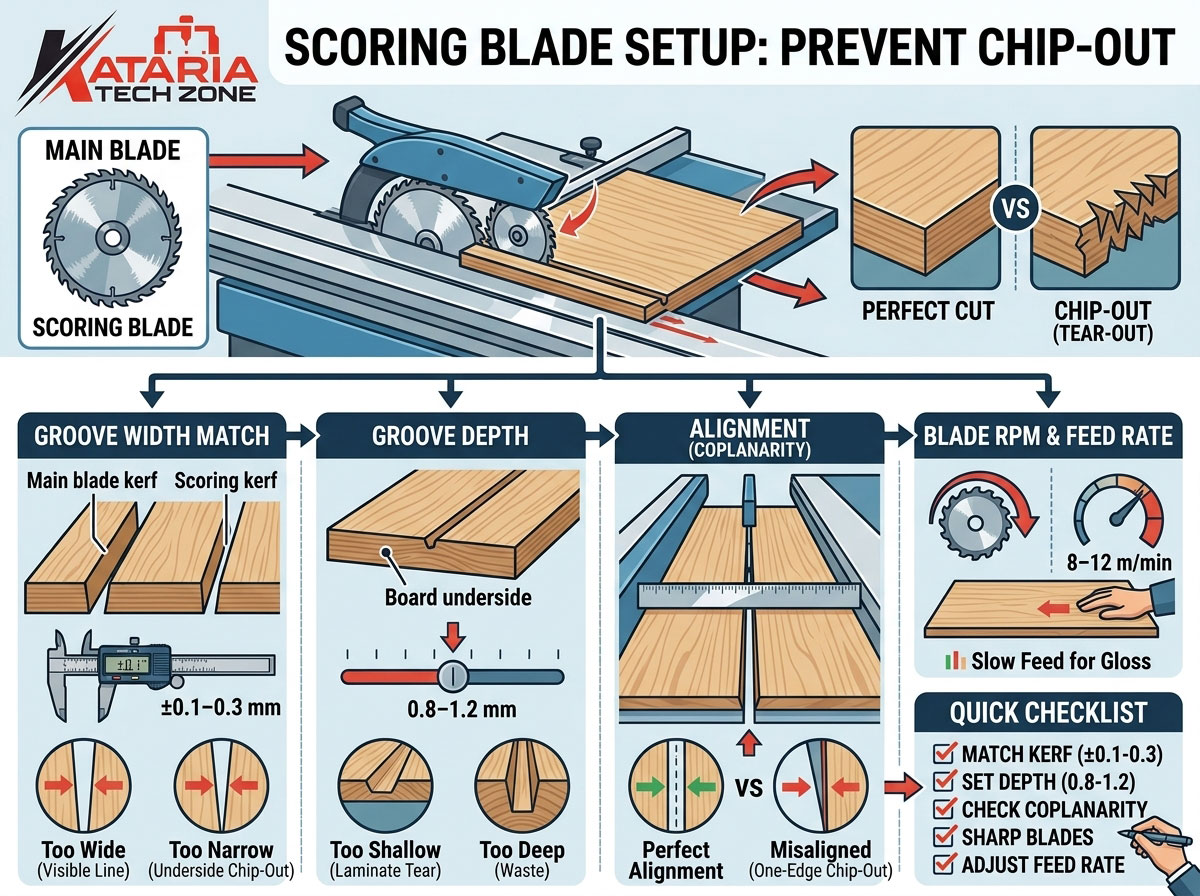
The 4 Scoring Blade Parameters That Actually Matter
Before troubleshooting specific symptoms, it helps to understand the four adjustments every sliding panel saw scoring unit shares. Get these right, and 95% of chip-out issues disappear.
1. Scoring Groove Width vs. Main Blade Kerf
The scoring blade’s cutting width (kerf) must be equal to or very slightly wider than the main saw blade’s kerf — typically by 0.1–0.3 mm on each side.
- Too narrow: The main blade’s teeth extend beyond the pre-scored groove and tear into un-scored laminate, causing chip-out on one or both edges of the cut.
- Too wide: You get a visible witness line or step on the underside of the panel — not chip-out, but a cosmetic defect that’s just as unacceptable on a visible face.
Fix: Match scoring blade kerf to main blade kerf using shim washers behind the scoring blade, or use a scoring blade specifically designed for your main blade’s kerf width (most manufacturers list this on the blade packaging).
2. Scoring Groove Depth
The groove cut by the scoring blade should be 0.8–1.2 mm deep into the underside of the panel — enough to fully sever the laminate and a fraction of the substrate, but not so deep that it wastes material thickness or affects panel strength.
- Too shallow (under 0.5 mm): The laminate isn’t fully pre-cut, so the main blade still tears it on exit.
- Too deep (over 1.5 mm): Increases wear on the scoring blade, wastes cutting capacity, and can cause a visible line if the width isn’t perfectly matched.
Fix: Adjust the scoring unit’s vertical height using the fine-adjustment screw or digital height readout (available on CNC and digital-readout panel saws). Check depth with a scrap cut and a depth gauge or simply by visual inspection of the groove.
3. Scoring Blade RPM and Feed Rate Ratio
The scoring blade typically runs at a higher RPM relative to feed speed than the main blade, because it’s making a much shallower, finer cut. If your feed rate is too fast for the scoring blade’s RPM, the groove becomes rough or inconsistent, which defeats its purpose.
Fix: Most sliding panel saws with electronic or inverter-driven scoring units let you set RPM independently. As a starting point, keep feed rate moderate (8–12 m/min for laminated boards) and let the scoring blade run at its rated maximum RPM. Slow the feed rate further for high-gloss or acrylic-faced laminates, which are more brittle.
4. Scoring Blade and Main Blade Alignment (Coplanarity)
The scoring blade must sit perfectly in line with the main blade’s cutting path — not offset left or right. Even a 0.1–0.2 mm misalignment causes the scored groove to sit off-center from the main blade’s kerf, which reintroduces chip-out on one edge.
Fix: Use a straight edge or the machine’s built-in laser/alignment guide (standard on most modern sliding table panel saws) to verify the scoring blade centerline matches the main blade centerline before every laminate production run, and after any blade change.
Step-by-Step Troubleshooting: Match the Symptom to the Fix
| Symptom | Likely Cause | Fix |
|---|---|---|
| Chip-out on both top and bottom edges | Scoring unit not engaged, worn out, or missing | Confirm scoring blade is raised and running; inspect for worn/dull carbide tips |
| Chip-out only on the underside | Groove too shallow or blade misaligned | Increase scoring depth to 0.8–1.2 mm; check coplanarity |
| Chip-out on one edge only | Scoring blade offset from main blade centerline | Realign scoring unit to main blade centerline |
| Visible witness line but no chip-out | Scoring groove wider than main blade kerf | Reduce scoring width to match kerf exactly |
| Chip-out appears only on high-gloss/acrylic laminate | Feed rate too high for brittle facing | Reduce feed rate; consider a finer-tooth main blade |
| Chip-out increases over the shift | Scoring blade dulling faster than main blade | Rotate/replace scoring blade more frequently; it wears faster due to shallow, high-friction cuts |
| Inconsistent groove depth across the panel length | Table or scoring unit not level, or clamping pressure inconsistent | Check machine leveling and pressure beam/clamp settings |
Blade Selection Also Matters
Even a perfectly adjusted scoring unit can’t fully compensate for the wrong blade choice:
- Main blade: Use a triple-chip grind (TCG) or alternate top bevel (ATB) carbide-tipped blade with a high tooth count (72–96 teeth for a 300–350 mm blade) when cutting laminated and veneered panels. Fewer, more aggressive teeth are fine for solid timber but will chip laminate.
- Scoring blade: Should always be a dedicated scoring/scribing blade, never a repurposed standard blade. These have a specific tooth geometry designed for shallow, clean pre-scoring cuts.
- Blade condition: A dull scoring blade is one of the most common — and most overlooked — causes of chip-out. Because it makes a small, shallow cut, wear isn’t always visually obvious, but its cutting performance degrades quickly. As a rule of thumb, sharpen or replace the scoring blade roughly twice as often as the main blade in high-volume laminate cutting.
Quick Pre-Run Checklist for Chip-Free Laminate Cutting
Before starting a laminate cutting run on your sliding panel saw, run through this checklist:
- Scoring blade width matches main blade kerf (±0.1–0.3 mm)
- Scoring groove depth set to 0.8–1.2 mm
- Scoring and main blade are perfectly coplanar/aligned
- Both blades are sharp and free of resin buildup
- Feed rate is appropriate for the laminate type (slower for high-gloss/acrylic)
- Pressure beam and clamps are holding the panel firmly with no vibration
- A test cut on scrap material confirms a clean, chip-free edge on both faces
Running this checklist at the start of each shift takes less than five minutes and prevents the majority of laminate chip-out complaints before they cost you material.
When Setup Isn’t Enough: It Might Be the Machine
If you’ve verified all four scoring parameters and chip-out still persists, the issue may be mechanical rather than a setup error — worn spindle bearings causing blade vibration, an aging scoring motor that can’t maintain RPM under load, or a sliding table that isn’t running true. This is common on older or heavily used panel saws where tolerances have drifted over years of production.
At Kataria Tech Zone, our sliding table panel saws are built with precision-ground guide rails, independently adjustable scoring units, and digital readouts that make dialing in scoring width, depth, and alignment fast and repeatable — so operators spend less time troubleshooting and more time cutting. If you’re evaluating a new machine or upgrading an aging one, our panel saw product range is engineered specifically for chip-free performance on laminated, veneered, and melamine-faced boards.
For workshops also finishing panel edges after cutting, pairing your panel saw with a quality edge banding machine ensures the same chip-free standard carries through to the final product.
Related Reading from Kataria Tech Zone
- Maximizing Workshop ROI: How to Choose Between a Vertical and Horizontal Panel Saw
- Why Was the Invention of the Sliding Panel Saw Considered a Major Advancement in Woodworking?
- Browse all Panel Saw Machines
- More Woodworking Machinery Guides on the Kataria Tech Zone Blog
Frequently Asked Questions
Q: Do I need a scoring blade if I only cut solid wood? No — scoring blades are specifically for laminated, melamine-faced, veneered, or foil-wrapped boards. Solid timber doesn’t have a brittle facing layer, so chip-out risk is much lower and a scoring unit isn’t essential.
Q: How often should I check scoring blade alignment? Check alignment at the start of every shift when running laminate-heavy production, and always after changing either blade. Vibration and thermal expansion during long runs can shift alignment slightly over time.
Q: Can I fix chip-out just by slowing down the feed rate? Slowing feed rate helps but doesn’t fix a fundamental scoring setup error. If the groove is misaligned or too shallow, a slower feed rate will reduce — but not eliminate — chip-out. Always correct the scoring parameters first.
Q: What’s the difference between chip-out and tear-out? The terms are largely interchangeable in panel processing; both describe the laminate or veneer cracking and lifting away from the substrate at the cut edge, typically on the underside where the blade exits the material.
Need Help Setting Up Your Panel Saw for Chip-Free Cutting?
Our technical team at Kataria Tech Zone helps woodworking businesses across India set up, calibrate, and troubleshoot their panel saws for zero-defect laminate cutting. Get in touch with us or explore our full range of panel saws built for precision, speed, and chip-free performance.